linux系统安装miniconda3
一、下载minconda3
下载地址:https://docs.conda.io/en/latest/miniconda.html
一般国内访问比较困难,可到清华软件镜像站 Index of /anaconda/miniconda/ | 清华大学开源软件镜像站 | Tsinghua Open Source Mirror

需要特别注意自己的下载版本和自己的硬件一致,否则安装会出问题,下面以ubuntu 64位来说明安装过程。
先下载:Miniconda3-py38_22.11.1-1-Linux-x86_64.sh
注意,
1、需要是Miniconda3
2、pyXX表示python版本号。
3、Linux-x86_64表示是linux x86的64位机器。
二、安装miniconda3
bash Miniconda3-latest-Linux-x86_64.sh
最后一路回车,

接受license

如果是默认路径安装直接回车

在选择是否需要initiate的时候选择yes,默认是no。

选择yes之后,cat ~/.bashrc能看到最后加入了如下字段。

然后执行source .bashrc,表示直接使能环境变量。
安装过程会提示conda config --set auto_activate_base false,表示是否需要在登录后自动是能conda base环境,默认回车表示no。
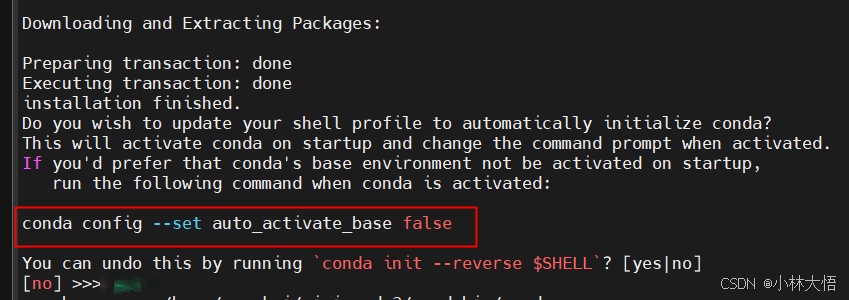
关闭自动启动conda环境的命令
conda config --set auto_activate_base false三、离线创建python环境
查看已经创建的虚拟环境,刚开始只有base
conda env list可以直接克隆base环境,来创建自己的环境
conda config --set offline true
conda create -n new_env --clone base
其中new_env应该替换为自己需要创建的环境名字。
可以在创建的时候指定python环境:conda create -n 环境名 python=版本号
以python3.9为例:
conda create -n my_env python=3.9 以上命令表示,创建my_env的环境,指定其默认python版本为3.9
四、激活&删除虚拟环境
执行如下命令激活虚拟环境,需要注意new_env需要已经创建,通过conda env list可以查看到。
source activate new_env
#
# To activate this environment, use
#
#     $ conda activate ykai
#
# To deactivate an active environment, use
#
#     $ conda deactivate
删除虚拟环境命令,假设需要删除一个名为newenv 的环境:
conda remove -n newenv --all
五、安装第三方库
5.1 python pip 更改国内源
此方法为永久改变源,如果你需要的库,国内源没有的话,需要重置源为默认
清华源相关代码
pip config set global.index-url https://pypi.tuna.tsinghua.edu.cn/simple其他源
豆瓣 https://pypi.doubanio.com/simple/
网易 https://mirrors.163.com/pypi/simple/
阿里云 https://mirrors.aliyun.com/pypi/simple/
腾讯云 https://mirrors.cloud.tencent.com/pypi/simple
清华大学 https://pypi.tuna.tsinghua.edu.cn/simple/
取消所有源,替换为默认
pip config unset global.index-url5.2 pip3 install acuity出错
如果大家看到以下错误会怎么处理?


Building wheels for collected packages: ruamel.yaml
  Building wheel for ruamel.yaml (setup.py) ... error
  error: subprocess-exited-with-error

  × python setup.py bdist_wheel did not run successfully.
  │ exit code: 1
  ╰─> [579 lines of output]
      sys.argv ['/tmp/pip-install-sqdifa38/ruamel-yaml_13238d60aed04f31841b95c554bebfe3/setup.py', 'bdist_wheel', '-d', '/tmp/pip-wheel-qci5d5wn']
      test compiling test_ruamel_yaml
      /home/ykai/miniconda3/envs/ykai/lib/python3.9/site-packages/setuptools/_distutils/dist.py:261: UserWarning: Unknown distribution option: 'test_suite'
        warnings.warn(msg)
      /home/ykai/miniconda3/envs/ykai/lib/python3.9/site-packages/setuptools/dist.py:655: SetuptoolsDeprecationWarning: The namespace_packages parameter is deprecated.
      !!

              ********************************************************************************
              Please replace its usage with implicit namespaces (PEP 420).

              See https://setuptools.pypa.io/en/latest/references/keywords.html#keyword-namespace-packages for details.
              ********************************************************************************

      !!
        ep.load()(self, ep.name, value)


      ext/_ruamel_yaml.c: In function ‘PyInit__ruamel_yaml’:
      ext/_ruamel_yaml.c:25793:34: error: ‘PyTypeObject {aka struct _typeobject}’ has no member named ‘tp_print’; did you mean ‘tp_dict’?
         __pyx_type_12_ruamel_yaml_Mark.tp_print = 0;
                                        ^~~~~~~~
                                        tp_dict
      ext/_ruamel_yaml.c:25810:37: error: ‘PyTypeObject {aka struct _typeobject}’ has no member named ‘tp_print’; did you mean ‘tp_dict’?
         __pyx_type_12_ruamel_yaml_CParser.tp_print = 0;
                                           ^~~~~~~~
                                           tp_dict
      ext/_ruamel_yaml.c:25821:38: error: ‘PyTypeObject {aka struct _typeobject}’ has no member named ‘tp_print’; did you mean ‘tp_dict’?
         __pyx_type_12_ruamel_yaml_CEmitter.tp_print = 0;
                                            ^~~~~~~~
                                            tp_dict
      /home/ykai/miniconda3/envs/ykai/include/python3.9/cpython/unicodeobject.h:446:26: note: declared here
       static inline Py_ssize_t _PyUnicode_get_wstr_length(PyObject *op) {
                                ^~~~~~~~~~~~~~~~~~~~~~~~~~
      error: command '/usr/bin/gcc' failed with exit code 1
      [end of output]

  note: This error originates from a subprocess, and is likely not a problem with pip.
  ERROR: Failed building wheel for ruamel.yaml
  Running setup.py clean for ruamel.yaml
Failed to build ruamel.yaml
ERROR: ERROR: Failed to build installable wheels for some pyproject.toml based projects (ruamel.yaml)
一般都会以为是 error: command '/usr/bin/gcc' failed with exit code 1 或者error: subprocess-exited-with-error错误来处理,或者zipp-3.20.2-py3-none-any.whl安装错误来处理,其实都不是。
如果我们搜索的关键是 has no member named ‘tp_print’; did you mean ‘tp_dict’?就会发现:
从Python 3.9中的API中删除了tp_print方法.错误" 'tp_print':不是'_typeobject'的成员,表示代码是针对Python <= 3.8的,降级到Python 3.8,然后重试问题解决。
5.3 acuity执行出错
AttributeError: module 'numpy' has no attribute 'bool'.

这个问题是由于numpy的版本问题 1.22或者1.24都容易出现这个问题,所以我们需要将numpy换成1.23的版本,可以使用如下命令
pip3 install numpy==1.23.25.4 acuity执行出错
ModuleNotFoundError: No module named 'onnxoptimizer'解决方法:
pip3 install onnxoptimizer
python setup.py install安装setuptools,pip踩坑记录(下载,配置环境变量)-CSDN博客

魔乐社区(Modelers.cn) 是一个中立、公益的人工智能社区,提供人工智能工具、模型、数据的托管、展示与应用协同服务,为人工智能开发及爱好者搭建开放的学习交流平台。社区通过理事会方式运作,由全产业链共同建设、共同运营、共同享有,推动国产AI生态繁荣发展。
更多推荐


 20
20 0
0- 0


 已为社区贡献2条内容

所有评论(0)