本地调用大模型api接口
一、登陆官网
https://platform.openai.com/docs/overview
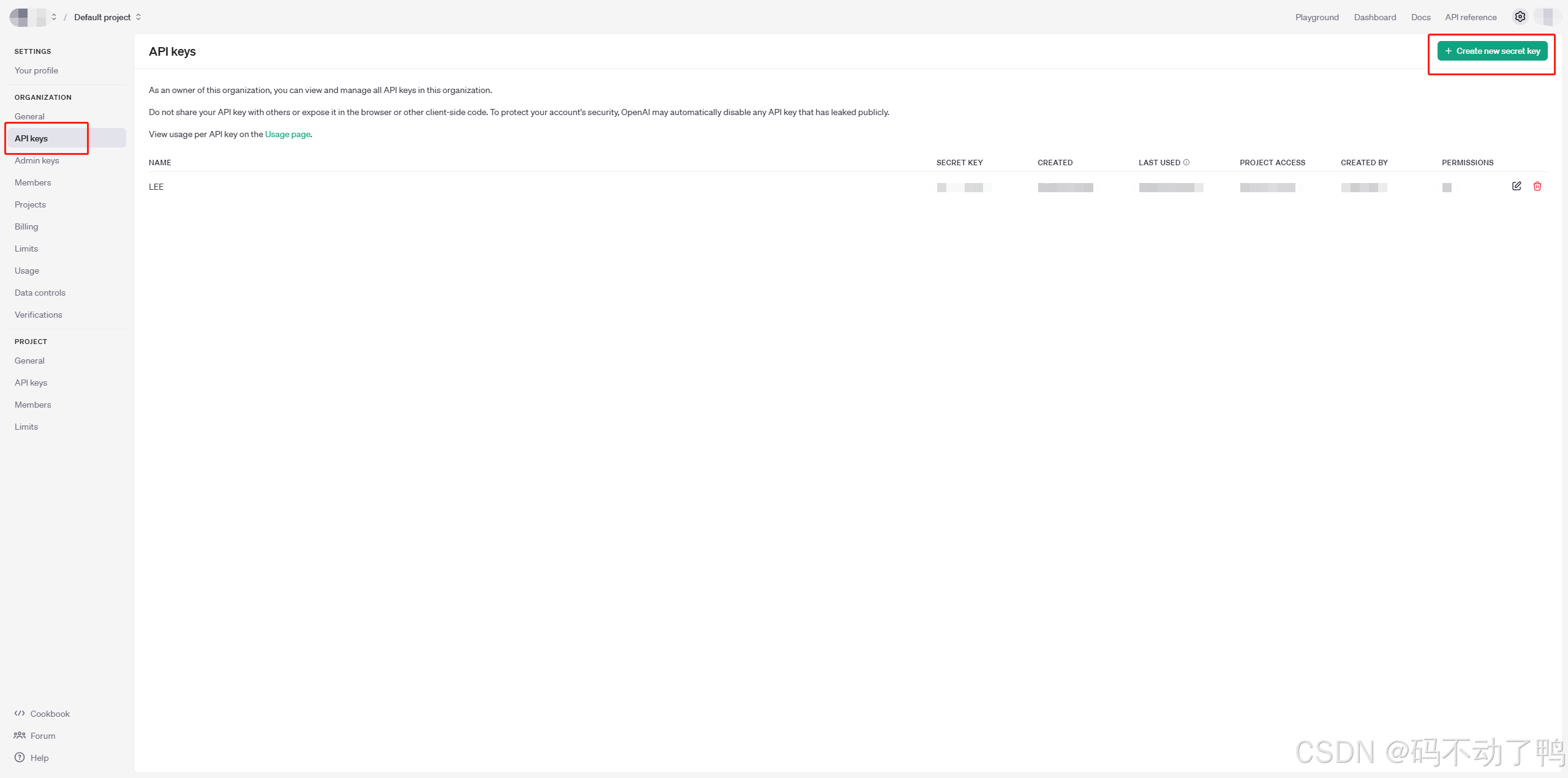
获取API密钥:在官网首页左侧栏找到【API keys】,点击右上角创建,随意输入自定义名称
重点:apikey仅展示一次,一定要复制粘贴自己保存好!!!
第二步:进入cmd,进行环境变量和调用api
1、win+r 输入cmd 进入命令行界面
2、安装openai库
pip install openai3、 进入python编译环境

4、
调用方式一:
import openai

# 确保已经设置环境变量,或者直接在代码中设置api_key
openai.api_key = os.getenv("OPENAI_API_KEY")  # 从环境变量获取API密钥
# 或者直接设置:openai.api_key = "your_actual_openai_api_key"

messages = [{"role": "user", "content": "hello, where is USA"}]

# 调用Chat API
response = openai.ChatCompletion.create(
    model="gpt-3.5-turbo",  # 或者其他模型,比如 "gpt-4"
    messages=messages
)

# 获取回复内容
print(response['choices'][0]['message']['content'])
调用方式二:
import os
from openai import OpenAI

os.environ["OPENAI_API_KEY"] = "*******"

client = OpenAI()

completion = client.chat.completions.create(
  model="gpt-3.5-turbo",
  messages=[
    {"role": "system", "content": "You are a poetic assistant, skilled in explaining complex programming concepts with creative flair."},
    {"role": "user", "content": "Compose a poem that explains the concept of recursion in programming."}
  ]
)

print(completion.choices[0].message)
三、问题
1、出现网络连接失败的问题
(1)进入控制面板
(2)选择【网络和Internet】模块
(3)选择【Internet选项】模块
(4)点击【连接】按钮
(5)点击【局域网设置】按钮
(6)记录你电脑的如图信息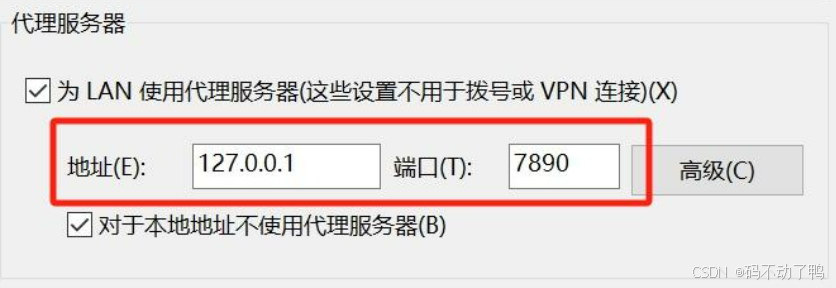
(7)另外建立一个python在里面运行
import os

os.environ["http_proxy"] = "http://127.0.0.1:7890"
os.environ["https_proxy"] = "http://127.0.0.1:7890"
2、运行报错
Error code: 429 - {'error': {'message': 'You exceeded your current quota, please check your plan and billing details. For more information on this error, read the docs: https://platform.openai.com/docs/guides/error-codes/api-errors.', 'type': 'insufficient_quota', 'param': None, 'code': 'insufficient_quota'}}
是因为openai接口服务是收费的,需要在官网的Billing模块进行充值。

魔乐社区(Modelers.cn) 是一个中立、公益的人工智能社区,提供人工智能工具、模型、数据的托管、展示与应用协同服务,为人工智能开发及爱好者搭建开放的学习交流平台。社区通过理事会方式运作,由全产业链共同建设、共同运营、共同享有,推动国产AI生态繁荣发展。
更多推荐


 10
10 0
0- 0


 已为社区贡献2条内容

所有评论(0)